

It is getting to close to the beginning of the school year so we thought focus this week's journaling prompts on: School Days
- What was school like when you were younger?
- Was there something you were really good at in school? What school activities did you participate in?
- What did you want to be when you grew up?
- Are there any funny school-related stories to share?
- Who were your favorite classmates?
- If you could spend the day doing anything, what would it be?
We'd love to hear your thoughts on our journaling prompts! Next week we'll be providing prompts on: Interests & Hobbies.
This week we are continuing on in our series of journaling prompts with the 2nd part of our series on: Childhood
- What was life like for you as a child?
- What experiences do you remember having with your siblings?
- What was your earliest childhood memory?
- Did you ever get into mischief as a child?
- Who were the important people in your life & what did you learn from these people?
- What interests & talents did you have early on?
Please leave comments to let us know how useful these prompts are in your journaling.
Writing your life story or documenting your memories can be tough. A blank sheet of paper or notebook can be especially daunting for you if you've never written anything personal about yourself before. To help you in this process, we have developed a 12-part series of storybooking prompts that you can use as a basis for documenting your life.
The first part is: Family History
- What is your birth date and place of birth?
- What are the names of your parents & siblings?
- Where did your family come from?
- What is unique or special about your background?
- How did your ancestors contribute to your future?
- How did your parents choose your name (any nicknames)?
We hope you enjoy using these prompts as much as we enjoyed creating them for you! Please leave a comment and let us know how they worked for you. Look out for the next prompts in the series: Childhood.

So much so that I have started my 2nd yarn, using a bat of Purple People Eater (purple is my favorite color). My plan is to spin this yarn as thin as I can and try to create something in a sport or dk weight, for shawl knitting (lace weight would be too ambitious).
I have to say I never thought I'd become a spinner but I have to say it is both enjoyable and relaxing,and has a useful output. I can see myself easily creating far more handspun yarn than I'll ever have time to knit, so knitter friends you may be getting some handspun sometime soon!
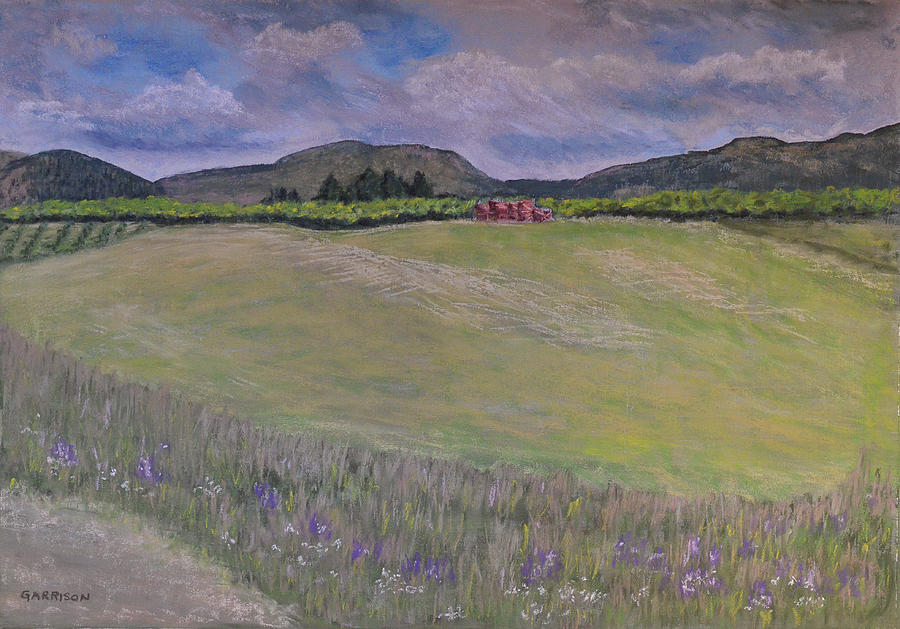
Finally finished this painting I started over a year ago. It's been sitting on my easel waiting for some love. The missing part was the foreground hedgerow and the apple boxes.
Not sure if non-Okanaganites will recognize those!
I'm pretty happy with how it turned out, especially those rolling clouds.
Like many people who have been touched by either an iPhone or an iPad, I made the move to the Mac with my last computer purchase (iMac). I love it! But I still have my PC laptop running Windows 7.
I am still trying to get the two systems to live in harmony. I would like to be able to share a Lightroom catalog and photos between the two systems.
I already have a 640GB external hard drive (EHD) attached to my iMac and formatted in HFS format (Mac). This was necessary because the iMac won't Time Machine backup an EHD unless it is HFS.
Of course this introduced the problem of how the Windows machine was going to read the drive. During my research I came across a program called MacDrive that claims to provide read/write access to EHDs on a windows system. I installed the software and, yes, the windows machine could read and write to the drive. Of course I wouldn't be writing this post if that was the end of the story :)
I unplugged the EHD and took it back to my iMac. Wait, the iMac can't see the EHD? What's that about? I plugged the EHD back into the windows machine and lo and behold it works fine. So let me see, software that is specifically designed for your windows machine to read your Mac's EHD suddenly won't let the Mac see it. Isn't that the whole point?
Now I have a mac-formatted EHD that only a Windows machine running MacDrive can read. I am scared to uninstall MacDrive until I've finished backing up the EHD onto the Windows machine just in case.
So if you are successfully sharing an EHD between Windows and Mac, can you please leave a comment as to how you are doing it and which format the drive is in (NTFS, FAT32 or HFS).
Honestly, this makes me want to run out and buy a new mac laptop!
I am still trying to get the two systems to live in harmony. I would like to be able to share a Lightroom catalog and photos between the two systems.
I already have a 640GB external hard drive (EHD) attached to my iMac and formatted in HFS format (Mac). This was necessary because the iMac won't Time Machine backup an EHD unless it is HFS.
Of course this introduced the problem of how the Windows machine was going to read the drive. During my research I came across a program called MacDrive that claims to provide read/write access to EHDs on a windows system. I installed the software and, yes, the windows machine could read and write to the drive. Of course I wouldn't be writing this post if that was the end of the story :)
I unplugged the EHD and took it back to my iMac. Wait, the iMac can't see the EHD? What's that about? I plugged the EHD back into the windows machine and lo and behold it works fine. So let me see, software that is specifically designed for your windows machine to read your Mac's EHD suddenly won't let the Mac see it. Isn't that the whole point?
Now I have a mac-formatted EHD that only a Windows machine running MacDrive can read. I am scared to uninstall MacDrive until I've finished backing up the EHD onto the Windows machine just in case.
So if you are successfully sharing an EHD between Windows and Mac, can you please leave a comment as to how you are doing it and which format the drive is in (NTFS, FAT32 or HFS).
Honestly, this makes me want to run out and buy a new mac laptop!


