

Wondering what to do with that lovely new fountain pen you just bought? Or maybe you feel guilty about that vintage fountain pen you inherited but has been lingering in a drawer....
Here are 12 things to do with your fountain pen:

Here are 12 things to do with your fountain pen:

- Write a letter. Yes, really. People love to get letters. It doesn't have to be long but it shows that you care.
- Keep a journal or diary. Feeling anxious? Write your thoughts in a journal. Traveling? Write down your experiences.
- Practice your handwriting. After several years of not writing regularly, I had to re-learn cursive. Your fountain pen will really help you produce beautiful handwriting.
- Write a novel. I have 2 novels started. I'm not sure when I will ever finish them but they are like worlds waiting for me to join them - to pop in and out to see what the characters are up to.
- Write a cheque. I can't remember the last time I did but signatures look so much nicer in real ink. Use bulletproof (permanent) ink if you are worried about forgeries/fraud.
- Sketch drawings. Even a bad sketch looks better in ink. Try using a bulletproof (permanent) ink and add some watercolour washes.
- Make a list. Shopping lists, to-do lists, honey-do lists, books to read, bucket list.
- Notes. Class notes, meeting notes, self-study notes (for when you want to master a subject).
- Write a greeting card, post-card or love-note. Handwritten love notes are more romantic than text messages ;)
- Write an inspirational quote.
- Draft a blog post or essay.
- Use a planner or bullet journal.
Finally, fountain pens are made to be used. They will last a lifetime and are environmentally friendly. Think of all the rollerball pens you've used and thrown away so far. Use your pen and never again throw away another rollerball into the landfill.
I have been loving my new butterfly effect journal by Jane Davenport. The butterfly effect journal is an epiphany to me, it is the best notebook/journal/planner I have ever owned. Let me explain why.
I don't need a planner - I keep appointments on my iphone - using gmail for personal and microsoft exchange for work. But I hate using my phone for To Do lists and reminders. It seems to take more effort to enter them than to just do the item, plus I always forget to look at it.
So I like to keep To Do lists on paper. Usually I use a notebook of the lined variety and use a symbol to indicate "To Do", "In Progress", "Done". I scratch through the entire list in a diagonal directly when I'm done so I know I don't need to look at it anymore. I also like to art journal. This is a relatively new thing for me. It started out as individual paintings and then migrated into a journal. I use a watercolour Moleskine and a plain paper Moleskine. That's *two* Moleskines if you are counting. Oh, but wait, there's a third journal, it's for writing and has lined paper. But hang on a minute, I have another lined journal I use for poems (yes I like writing poems) and another grid journal for practicing lettering/calligraphy. So now we're up to 5..... but none of them are full. In fact, only 1 is even at the half way mark. It takes a long time to fill up a notebook with poetry because I'm not doing it all the time. And of course, I can't possibly carry 5 notebooks around with me and never have the one I want. This stalls my creativity (like I need an excuse).
So enter the butterfly effect journal. I know you're wondering "what's so great about the butterfly effect journal?" Well, this style of journal is entirely new to me. I feel like I have been living under a rock because it's actually quite common (at least according to YouTube).
The butterfly effect journal is a Traveler's Notebook (TN for the initiated) style popularized by the Midori TN. While the Midori TN is a leather cover notebook, Jane Davenport (mixed media artist from Australia) has created a canvas notebook that utilizes the same concept as the Midori TN. The notebook has no paper in it, and you purchase and add inserts into it as required. The inserts can be lined, grid, plain, watercolour paper, marker paper and so on, and there are other items available like plastic covers, business card holders and zippered pockets. Basically its a customizable notebook to suit your lifestyle. Also available are planners - month, week, day to a page or opening.
This means that I can add inserts using different types of paper for different purposes. In fact, I don't even have to buy inserts, I can make them myself or even use loose leaf paper folded down the center (cut to the right size, approximately 8x8 inches). Problem solved. I can go from 5 journal to a single journal and carry it around with me for when inspiration strikes. As each insert is filled, it can be removed and a new insert added to replace it.
So why "butterfly effect"? Jane noticed that when the book folds back on itself it looks like butterfly wings.... so cute!
I don't need a planner - I keep appointments on my iphone - using gmail for personal and microsoft exchange for work. But I hate using my phone for To Do lists and reminders. It seems to take more effort to enter them than to just do the item, plus I always forget to look at it.
So I like to keep To Do lists on paper. Usually I use a notebook of the lined variety and use a symbol to indicate "To Do", "In Progress", "Done". I scratch through the entire list in a diagonal directly when I'm done so I know I don't need to look at it anymore. I also like to art journal. This is a relatively new thing for me. It started out as individual paintings and then migrated into a journal. I use a watercolour Moleskine and a plain paper Moleskine. That's *two* Moleskines if you are counting. Oh, but wait, there's a third journal, it's for writing and has lined paper. But hang on a minute, I have another lined journal I use for poems (yes I like writing poems) and another grid journal for practicing lettering/calligraphy. So now we're up to 5..... but none of them are full. In fact, only 1 is even at the half way mark. It takes a long time to fill up a notebook with poetry because I'm not doing it all the time. And of course, I can't possibly carry 5 notebooks around with me and never have the one I want. This stalls my creativity (like I need an excuse).
So enter the butterfly effect journal. I know you're wondering "what's so great about the butterfly effect journal?" Well, this style of journal is entirely new to me. I feel like I have been living under a rock because it's actually quite common (at least according to YouTube).
 |
| My Jane Davenport mermaid "butterfly effect journal" *before* |
The butterfly effect journal is a Traveler's Notebook (TN for the initiated) style popularized by the Midori TN. While the Midori TN is a leather cover notebook, Jane Davenport (mixed media artist from Australia) has created a canvas notebook that utilizes the same concept as the Midori TN. The notebook has no paper in it, and you purchase and add inserts into it as required. The inserts can be lined, grid, plain, watercolour paper, marker paper and so on, and there are other items available like plastic covers, business card holders and zippered pockets. Basically its a customizable notebook to suit your lifestyle. Also available are planners - month, week, day to a page or opening.
This means that I can add inserts using different types of paper for different purposes. In fact, I don't even have to buy inserts, I can make them myself or even use loose leaf paper folded down the center (cut to the right size, approximately 8x8 inches). Problem solved. I can go from 5 journal to a single journal and carry it around with me for when inspiration strikes. As each insert is filled, it can be removed and a new insert added to replace it.
So why "butterfly effect"? Jane noticed that when the book folds back on itself it looks like butterfly wings.... so cute!
 |
| My butterfly effect journal - being a butterfly! |
If you are interested in trying this out for yourself, then Jane Davenport's butterfly effect journal is available exclusively at Michaels craft stores. If you don't live near a Michaels then I suggest ordering a Midori or a faux-dori (there are several knock off brands) which achieves the same thing. And don't forget to leave a message letting me know how it works out for you.
Not a week goes by, when I hear some doomsayer saying that it's all over for Apple, iPhone sales are going down or plateaued. But what they don't say is that Pokemon Go (the app taking the world by storm) won't run on anything less than an iPhone 5!!!

Think of all those kids whose parents, like me, gave them their cast off old iPhones. Typically I would get a phone every 2 or 3 years (depending on what's new) and give my tweens my old phones. But now, an old iPhone isn't good enough. My son's iPhone 4 (circa 2010) which still works well, won't run Pokemon Go because Pokemon Go requires iOS 8 which isn't supported on the iPhone 4.

So Pokemon Go has single handedly created a need for newer iPhones. Will this be translated into increased sales - you betcha!! Moms everywhere will be buying either new SE models or used iPhone 5/c/s for their kids - either way - translating into more iPhone sales for Apple.
How do I know this? Well, because I'm that mom and I bumped into another at the Telus mobile store. I don't want my kid playing Pokemon Go on my iPhone. So he gets his own used iPhone 5S with a 1GB data plan.
Apple is a winner here, as well as the phone carrier selling the data plan. And don't think this is limited to just Apple, Android phones have the same limitations (Android 4.4 to Android 6.0.1).
Think of all those kids whose parents, like me, gave them their cast off old iPhones. Typically I would get a phone every 2 or 3 years (depending on what's new) and give my tweens my old phones. But now, an old iPhone isn't good enough. My son's iPhone 4 (circa 2010) which still works well, won't run Pokemon Go because Pokemon Go requires iOS 8 which isn't supported on the iPhone 4.
So Pokemon Go has single handedly created a need for newer iPhones. Will this be translated into increased sales - you betcha!! Moms everywhere will be buying either new SE models or used iPhone 5/c/s for their kids - either way - translating into more iPhone sales for Apple.
How do I know this? Well, because I'm that mom and I bumped into another at the Telus mobile store. I don't want my kid playing Pokemon Go on my iPhone. So he gets his own used iPhone 5S with a 1GB data plan.
Apple is a winner here, as well as the phone carrier selling the data plan. And don't think this is limited to just Apple, Android phones have the same limitations (Android 4.4 to Android 6.0.1).
It's been two days since Pokemon Go was launched in Canada. My kids are totally crazy into the game and the novelty hasn't worn off yet. What interests me (as a systems analyst) is why nobody else thought of doing this sooner. You see, this concept isn't just for Pokemon, it would work for lots of other movies or game themes.

For example,
Wizard Go.
A game where you wander around collecting horcruxes and other magical items, including collecting magical eggs that hatch into magical creatures (like a baby Buckbeak). Where you go to Wizardstops to collect curses, spells and potions (like anti-freeze - a cure against freezing spells). Where you go to a Wizardgym and you choose (or are sorted into) a house and duel other wizards to win the gym for your house. Added features would be the wizard name generator where you given a name like Griselda Wagglybottom or Molly Buttertart, and instead of getting a free pokemon from Professor Willow, Olivander gives you a customized wand and you get to choose a cat, rat, toad or owl friend.

Or how about Minecraft Go.
A game where you wander around finding animals to milk, shear or kill, and get alerts when you are near buried treasure (diamonds, iron etc). Where you go to Craftingstops to craft your raw material into items and battle other miners at Minewars (like Skywars) where you are on a platform battling for your team. Added features would be "blockify" via the camera so the world looks blocky and zombie mode where zombies randomly appear to try to steal your collected items.

I am genuinely excited by the possibilities of the new interactive gaming platform and how immersive it is. It's a whole new level of gaming and bring AI to us without the usage of AI googles (something you won't find me wearing any time soon).
For example,
Wizard Go.
A game where you wander around collecting horcruxes and other magical items, including collecting magical eggs that hatch into magical creatures (like a baby Buckbeak). Where you go to Wizardstops to collect curses, spells and potions (like anti-freeze - a cure against freezing spells). Where you go to a Wizardgym and you choose (or are sorted into) a house and duel other wizards to win the gym for your house. Added features would be the wizard name generator where you given a name like Griselda Wagglybottom or Molly Buttertart, and instead of getting a free pokemon from Professor Willow, Olivander gives you a customized wand and you get to choose a cat, rat, toad or owl friend.
Or how about Minecraft Go.
A game where you wander around finding animals to milk, shear or kill, and get alerts when you are near buried treasure (diamonds, iron etc). Where you go to Craftingstops to craft your raw material into items and battle other miners at Minewars (like Skywars) where you are on a platform battling for your team. Added features would be "blockify" via the camera so the world looks blocky and zombie mode where zombies randomly appear to try to steal your collected items.
I am genuinely excited by the possibilities of the new interactive gaming platform and how immersive it is. It's a whole new level of gaming and bring AI to us without the usage of AI googles (something you won't find me wearing any time soon).
As a photographer, I've been using Adobe Lightroom for several years. For the past two years I have been using it as part of the Adobe Photographers' Creative Cloud Subscription along with Photoshop CC. I primarily use Lightroom as a Digital Asset Management tool and my main photo editor. I rarely use Photoshop CC for photo editing, choosing to use Nik filters instead. However, from time to time, I use Photoshop for digital scrapbooking.
The Canadian dollar has taken quite a beating in the past few months. Our dollar has gone from being on par with the US dollar to now only being worth 75 cents. This has impacted the price of several of my online services billed in USD, causing them to go up by approx. 30% yet my salary hasn't gone up by the same amount!
The Adobe CC subscription has gone from $11.20 CDN per month to almost $15 CDN per month. The only alternative to "renting" Lightroom is to buy it outright. Again Adobe and the exchange rate have steadily increased the cost from approx. $89 to $198 CDN in the past handful of years. This wouldn't be so bad if I wasn't buying it on top of the $300 I've spent on renting the software in the past two years.
When I recently purchased the Sony A6000 I noticed it came with Capture One Express for Sony. Capture One Pro (by Phase One) is a Lightroom competitor targeting professional photographers. As well as being a digital asset management system (DAM) it also allows you to modify photos directly in Capture One in the same way Lightroom does. On doing some further investigation into the software, I discovered that many photographers considered this software superior in both results and power to Lightroom. So I decided to give it a try by loading up my Lightroom catalog and experimenting.
 First, I had some trouble loading my 70k photo Lightroom catalog into Capture One Express. The catalog loaded by the system was dreadfully slow and kept crashing my Mac. I created a 2nd catalog and this time imported my photos directly into the catalog without trying to convert the LR catalog file. This went much better. As I didn't want to lose my keywords, I first set Lightroom to embed the keywords into Jpgs and create XMP sidecar files for the RAW images. I then imported the files into Capture One Express. Note, while Capture One Express says it is for Sony, I noticed it opens my Panasonic and Olympus RAW files - although I haven't tried working with them yet. [Edited: I now notice it will not preview my DNG files.]
It's early days but so far I'm really enjoying it. I like that it has the concept of layers and masks which is far more intuitive to me than how Lightroom handles adjustments. Many of the tools are easier to use also. You can still round trip files to Photoshop/Elements/Nik etc for further adjustment.
The Pro version is available as a $50 USD upgrade and buys you the ability to tether shoot and customize your workspace, although I am waiting to see if I *need* to do this upgrade. At this point, I'd say the biggest feature I'll miss from Lightroom is the ability to load photos directly to Flickr. However, this is not a dealbreaker for me.
So if like me, you are looking to get off the Creative Cloud, there are other alternatives out there. You don't have to be locked into Lightroom.
Other Lightroom to Capture One articles:
http://www.dearsusan.net/2014/07/02/242-showdown-1-lightroom-vs-capture-one/
http://ibakeheshoots.com/5-reasons-why-i-ditched-lightroom-for-capture-one-pro/
The Canadian dollar has taken quite a beating in the past few months. Our dollar has gone from being on par with the US dollar to now only being worth 75 cents. This has impacted the price of several of my online services billed in USD, causing them to go up by approx. 30% yet my salary hasn't gone up by the same amount!
The Adobe CC subscription has gone from $11.20 CDN per month to almost $15 CDN per month. The only alternative to "renting" Lightroom is to buy it outright. Again Adobe and the exchange rate have steadily increased the cost from approx. $89 to $198 CDN in the past handful of years. This wouldn't be so bad if I wasn't buying it on top of the $300 I've spent on renting the software in the past two years.
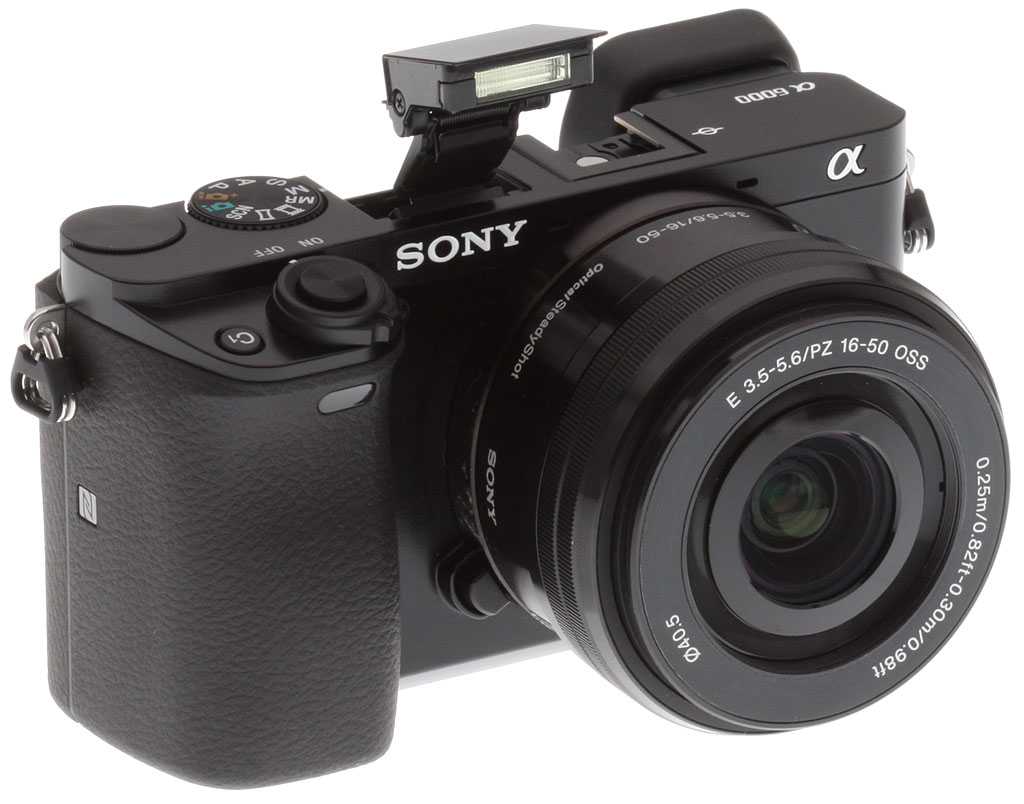 |
| Sony A6000 - Camera of the Year 2014 |
When I recently purchased the Sony A6000 I noticed it came with Capture One Express for Sony. Capture One Pro (by Phase One) is a Lightroom competitor targeting professional photographers. As well as being a digital asset management system (DAM) it also allows you to modify photos directly in Capture One in the same way Lightroom does. On doing some further investigation into the software, I discovered that many photographers considered this software superior in both results and power to Lightroom. So I decided to give it a try by loading up my Lightroom catalog and experimenting.

It's early days but so far I'm really enjoying it. I like that it has the concept of layers and masks which is far more intuitive to me than how Lightroom handles adjustments. Many of the tools are easier to use also. You can still round trip files to Photoshop/Elements/Nik etc for further adjustment.
So if like me, you are looking to get off the Creative Cloud, there are other alternatives out there. You don't have to be locked into Lightroom.
Other Lightroom to Capture One articles:
http://www.dearsusan.net/2014/07/02/242-showdown-1-lightroom-vs-capture-one/
http://ibakeheshoots.com/5-reasons-why-i-ditched-lightroom-for-capture-one-pro/
I was out walking at Gallaghers Canyon on Friday evening and noticed they were all set up for a wedding. It's a pretty nice set up for a wedding, with a great view. The only down side is that this is off to the side of one of the fairways and you literally have to cross the fairway to get there (not sure if they stop play?).
 |
| Wedding area, Gallaghers Canyon Golf Club, Kelowna, B.C. |


